
How to Publish a Game on Steam: Step-by-Step Guide (2026)
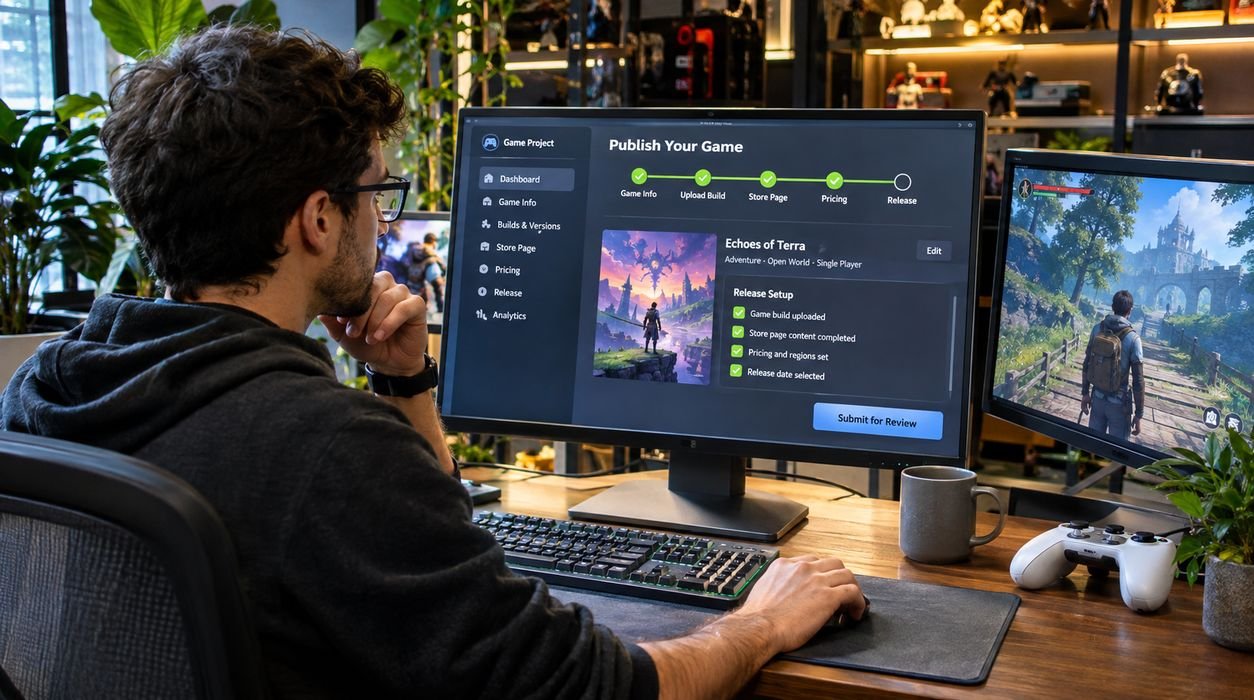
Publishing your first video game on Steam is an exciting milestone, especially if you’ve spent months or years developing an independent project. However, finishing your game is only one part of the process. Before players can download it, you need to register as a developer, complete the required paperwork, prepare your store page, upload your game files, and pass Valve’s review process.
Fortunately, learning how to publish a game on Steam is easier when you understand the requirements in advance.
Steam allows independent developers and established studios to distribute PC games without necessarily signing a traditional publishing agreement. You can manage your own release, set prices, update your game, and communicate directly with players.
This guide explains the Steam publishing process in 2026, including registration fees, technical requirements, launch timelines, store optimization, and common mistakes to avoid.
What Do You Need to Publish a Game on Steam?
Before registering with Steamworks, make sure you have the basic requirements for publishing a commercial game.
These include:
- A Steam account with access to Steamworks registration.
- A completed or sufficiently developed PC game.
- Legal rights to the game’s code, artwork, music, and other assets.
- Accurate personal or company identification.
- Valid banking and tax information.
- A payment method accepted for the Steam Direct fee.
- Store artwork, screenshots, descriptions, and promotional materials.
- A game build that meets Steam’s technical and content requirements.
You do not need to operate a large game development studio.
Solo developers, small independent teams, and established publishers can all use Steamworks, provided they meet Valve’s requirements.
However, you should consider your target audience before choosing Steam as your primary distribution platform.
Our guide to choosing the right gaming platform explains how PC, console, and other gaming ecosystems differ.
Step 1: Create a Steamworks Developer Account
The first step is registering through Steamworks, Valve’s developer and publishing platform.
Visit the official Steam Direct registration page and sign in using your Steam account.
During registration, you will need to complete the required agreements and provide information about yourself or your business.
Individual vs. Company Registration
Independent developers can generally register as individuals, while established studios may register through a legal business entity.
Your choice affects how you provide identification, tax information, and banking details.
For example, if you are publishing under a registered company, the legal entity information must be accurate and consistent with the required financial records.
Avoid using informal business names where Steam requests a legal name.
Complete Identity and Tax Verification
Steamworks requires information that allows Valve to identify its publishing partners and process payments.
Depending on your location and registration type, this may include identity verification, tax documentation, and banking information.
Verification can take time, so begin registration well before your intended release date.
Step 2: Pay the Steam Direct Publishing Fee
One of the most common questions developers ask is: How much does it cost to publish a game on Steam?
As of November 2026, Steam charges a $100 USD Steam Direct fee per app.
This means publishing three separate games generally requires three individual app fees.
The fee is paid through supported Steam payment methods, subject to regional availability and applicable taxes.
Is the Steam Direct Fee Refundable?
The fee is not directly refundable.
However, Valve allows developers to recoup the fee after the game reaches at least $1,000 in adjusted gross revenue from Steam Store and in-app purchases.
The fee recoupment appears in a subsequent payment report once the relevant conditions are met.
Importantly, adjusted gross revenue is not necessarily the same as the amount of money deposited into your bank account.
Does the $100 Fee Cover Everything?
No.
The Steam Direct fee covers the application submission requirement, not the entire cost of releasing a game.
Additional expenses may include:
- Game development software and equipment.
- Artwork and promotional materials.
- Music and sound licensing.
- Quality assurance testing.
- Localization and translation.
- Marketing and advertising.
- External development services.
A solo developer with existing tools may spend relatively little beyond the Steam fee, while a larger commercial project can require a substantial launch budget.
Step 3: Understand Steam’s Waiting Periods
Steam does not allow every newly registered developer to publish immediately.
Valve requires certain waiting periods for the first few releases.
Its current Steam Direct overview lists a 21-day waiting period after paying the application fee, while some Steamworks onboarding documentation still references 30 days.
Because official pages are not fully consistent, check the requirements displayed in your Steamworks account and plan conservatively.
Another important requirement is that your publicly visible Coming Soon page must generally be available for at least two weeks before release.
How Long Does Steam Review Take?
Valve’s published overview describes a review process that typically takes approximately one to five days.
However, this is not a guaranteed turnaround time.
Reviews may take longer when a submission requires corrections, additional verification, or further investigation.
For a first release, allowing several weeks of preparation is much safer than planning around the shortest possible timeline.
Step 4: Create Your Game’s Steam Store Page
Your Steam store page is one of the most important marketing assets you will create.
It introduces your game to potential buyers and helps them decide whether the experience matches their interests.
A well-designed page should communicate what makes your game interesting within seconds.
Write a Clear Game Description
Start with a short description explaining the central gameplay experience.
Avoid vague phrases such as “the most incredible adventure ever created.”
Instead, describe what players actually do.
For example:
“Explore abandoned space stations, solve environmental puzzles, and uncover the mystery behind a missing research crew.”
This description gives readers a clearer understanding of the game’s setting and mechanics.
Your longer description should explain gameplay systems, progression, major features, and any important multiplayer or technical requirements.
Upload High-Quality Screenshots
Use authentic screenshots that represent the game players will receive.
Choose images showing different environments, mechanics, and gameplay situations.
Avoid filling the screenshot gallery with nearly identical images.
If your game emphasizes challenging combat, exploration, or storytelling, make those features visible.
You can also review our video game difficulty settings guide to understand how gameplay options affect different player audiences.
Prepare Capsule Artwork
Steam uses capsule artwork in multiple areas of its storefront.
These images should make your game recognizable even at smaller display sizes.
Use readable typography, distinctive artwork, and consistent branding.
Follow the current Steamworks specifications for each required image rather than relying on outdated templates.
Step 5: Choose Your Game’s Categories and Tags
Steam uses categories and tags to help players discover games that match their interests.
Accurate classification is essential.
For example, a cooperative survival game might use relevant tags such as Survival, Multiplayer, Crafting, and Open World.
However, adding unrelated popular tags can attract the wrong audience.
Why Accurate Tags Matter
Players often browse Steam based on their favorite genres and gameplay features.
If your game appears in searches that do not match its actual content, visitors may leave without wishlisting or purchasing it.
Choose tags based on genuine gameplay characteristics.
You should also review comparable games to understand how similar titles describe themselves.
The goal is not to copy competitors but to communicate your game’s identity clearly.
Step 6: Upload Your Game Build Using Steamworks
After preparing the store page, you need to upload your playable game.
Steam provides SteamPipe, its content delivery system for uploading and distributing game builds.
The exact workflow depends on your operating system, development environment, and build configuration.
Prepare a Release Build
Before uploading, make sure your game:
- Launches without critical errors.
- Includes the intended release content.
- Saves and loads progress correctly.
- Supports the advertised operating systems.
- Uses properly licensed assets.
- Has working menus and settings.
- Does not contain unnecessary debugging tools.
You should also test installation and first-launch behavior on a clean system.
A game that works perfectly on your development computer may behave differently on another machine.
Configure Launch Options
Steamworks allows developers to configure executable files and launch settings.
Make sure these settings point to the correct files.
Incorrect launch configurations can prevent customers from starting the game.
Test Before Submission
Download and test the game through Steam’s distribution system rather than relying entirely on local development builds.
This helps identify packaging errors, missing dependencies, and installation problems.
If your title includes online multiplayer, performance testing is especially important.
Our article on reducing lag in online games explains common networking problems that can affect the player experience.
Step 7: Set Your Game’s Price
Choosing a price is a business decision, not simply a technical requirement.
Your price should reflect the game’s content, quality, target audience, and competitive position.
Research games with similar gameplay, production values, and expected playtime.
A short experimental puzzle game may require a different pricing strategy from a large narrative adventure.
Consider Regional Pricing
Steam supports pricing across multiple currencies and regions.
Developers should review available pricing tools and ensure the chosen amounts make sense for their audience.
Currency differences, purchasing power, and local market conditions can influence sales.
Should You Launch With a Discount?
Launch discounts can attract attention, but they should fit your broader marketing strategy.
Review Steam’s current discount rules before scheduling promotions.
Avoid assuming that aggressive discounting automatically creates long-term demand.
A strong game presentation, positive early reception, and an interested audience are often more valuable than price reductions alone.
Step 8: Submit Your Store Page and Game for Review
Before your game becomes publicly available, Valve must review the required store materials and game build.
Steamworks provides separate release checklists for store presence and application configuration.
Complete the required items and submit them through the appropriate review controls.
What Does Valve Review?
Valve checks whether the game and its store presentation meet platform requirements.
This can include:
- Store descriptions and promotional assets.
- Game functionality.
- Configuration and launch behavior.
- Content disclosures.
- Compliance with Steam policies.
Valve may request changes before approval.
Common Reasons for Delays
Problems may include missing store assets, inaccurate descriptions, incorrect executable configurations, or technical issues.
Some content may also require additional review.
Developers should carefully read the official Steamworks release process documentation before submitting.
Remember that approval does not automatically mean your game has launched.
You still need to complete the release process when eligible.
Step 9: Publish a Coming Soon Page and Build Wishlists
Your Coming Soon page gives players an opportunity to discover your game before launch.
It also allows interested visitors to add the title to their Steam wishlists.
Wishlists can help developers understand audience interest, although they do not guarantee future sales.
How to Promote Your Coming Soon Page
Start by sharing authentic development updates.
You might publish short gameplay clips, explain interesting mechanics, or show improvements made during production.
Useful promotional channels include developer communities, social media, gaming forums, and relevant content creators.
Avoid posting the same promotional message repeatedly in unrelated communities.
Consider Gaming Events
Conventions and industry showcases can provide opportunities to demonstrate your game and meet potential partners.
Our guide to the biggest gaming events in 2027 explains how developers can prepare for industry gatherings and game demonstrations.
For smaller studios, an online showcase or digital festival may offer a more affordable alternative to traveling internationally.
Step 10: Prepare Your Game for Launch Day
Once your store page and game build are approved, confirm that all release requirements have been satisfied.
Check your planned release date, pricing, store content, and build configuration.
You should also prepare a basic support system for customers.
Create a Launch Checklist
Before releasing your game, verify the following:
- The approved build is assigned correctly.
- Store descriptions and screenshots are accurate.
- Pricing is configured for intended regions.
- Achievements and supported features work as advertised.
- Customer support contact information is available.
- Critical bugs have been resolved.
- Your launch announcement is ready.
If your game requires online services, test server capacity and recovery procedures.
Players are more likely to remember a frustrating first experience than a perfectly written promotional announcement.
Release Your Game
When all conditions are satisfied, use the release controls provided in Steamworks.
Steam’s release process requires the developer or authorized publisher to initiate the final release action.
Do not assume that selecting a release date automatically publishes the game.
Follow the confirmation steps shown in your dashboard and verify that the public store page displays the correct release status.
Step 11: Manage Updates and Player Feedback
Publishing your game is not the end of the development process.
After launch, monitor player feedback, technical issues, and support requests.
Early reviews may reveal problems that did not appear during internal testing.
Prioritize Critical Issues
Focus first on bugs that prevent players from launching, saving, or completing the game.
Then address significant performance problems and gameplay issues.
Communicate clearly when updates are available.
Use Feedback Carefully
Not every player suggestion should become a development priority.
Look for recurring problems and evaluate whether proposed changes support your original game design.
If several players report the same confusing mechanic, consider whether better tutorials or interface improvements could help.
Keep Your Store Page Accurate
Update descriptions and screenshots when major features change.
Avoid advertising content that is not currently available unless it is clearly identified as planned.
Accurate communication builds trust with customers.
How Much Money Can You Make Publishing on Steam?
Steam revenue depends on sales volume, pricing, refunds, taxes, platform fees, and other factors.
For illustration, imagine a game priced at $15 that sells 1,000 copies at full price.
That represents $15,000 in gross customer spending before applicable adjustments.
It does not mean the developer receives $15,000.
Valve’s revenue share, refunds, taxes, regional pricing, and other contractual considerations can reduce the final amount.
Development and marketing expenses must also be considered when calculating profit.
Developers should build financial forecasts using realistic assumptions rather than relying on optimistic sales estimates.
Common Steam Publishing Mistakes to Avoid
First-time developers often focus heavily on completing their games while underestimating the work involved in publishing.
One common mistake is registering too close to the intended launch date.
Another is creating a store page without clear gameplay footage or compelling screenshots.
Some developers also spend heavily on advertising before confirming that players understand and enjoy the game.
Other avoidable mistakes include inaccurate tags, insufficient testing, unclear system requirements, and poor communication after launch.
A successful release requires technical preparation, realistic planning, and a clear understanding of the target audience.
Frequently Asked Questions
Can anyone publish a game on Steam?
Individuals and companies can apply to publish games through Steamworks, provided they satisfy Valve’s registration, verification, payment, and content requirements.
Is it free to publish a game on Steam?
No. Steam currently charges a $100 USD fee for each new app. The fee can be recouped after the product meets Valve’s adjusted gross revenue threshold.
How long does it take to publish a game on Steam?
The timeline depends on account verification, required waiting periods, store preparation, and review completion. Developers should allow several weeks and confirm the applicable requirements in Steamworks.
Do I need a publisher to release my indie game?
No. Steam allows eligible developers to self-publish. However, working with a publisher may provide additional marketing, funding, localization, or production support.
Can I update my game after publishing it?
Yes. Steamworks supports game updates, patches, and additional content after launch, subject to applicable platform requirements.
Does Steam guarantee sales?
No. Publishing a game makes it available through the platform, but commercial performance depends on demand, visibility, quality, pricing, marketing, and many other factors.
Final Thoughts
Learning how to publish a game on Steam involves much more than uploading a finished project.
You need to register through Steamworks, pay the application fee, complete verification, create an effective store page, upload a reliable build, satisfy review requirements, and prepare for launch.
For independent developers, Steam provides an accessible route to PC game distribution without requiring a traditional publishing agreement.
However, accessibility does not guarantee commercial success.
Start preparing early, test thoroughly, communicate honestly with players, and build a realistic marketing strategy.
With careful planning and consistent improvements, your first Steam release can become an important foundation for future game development projects.


